
Specific Directories
Monitor one or more specific directories, e.g. C:\Users\Downloads\, D:\Client Files\. Files entering any of these directories are caught and processed.
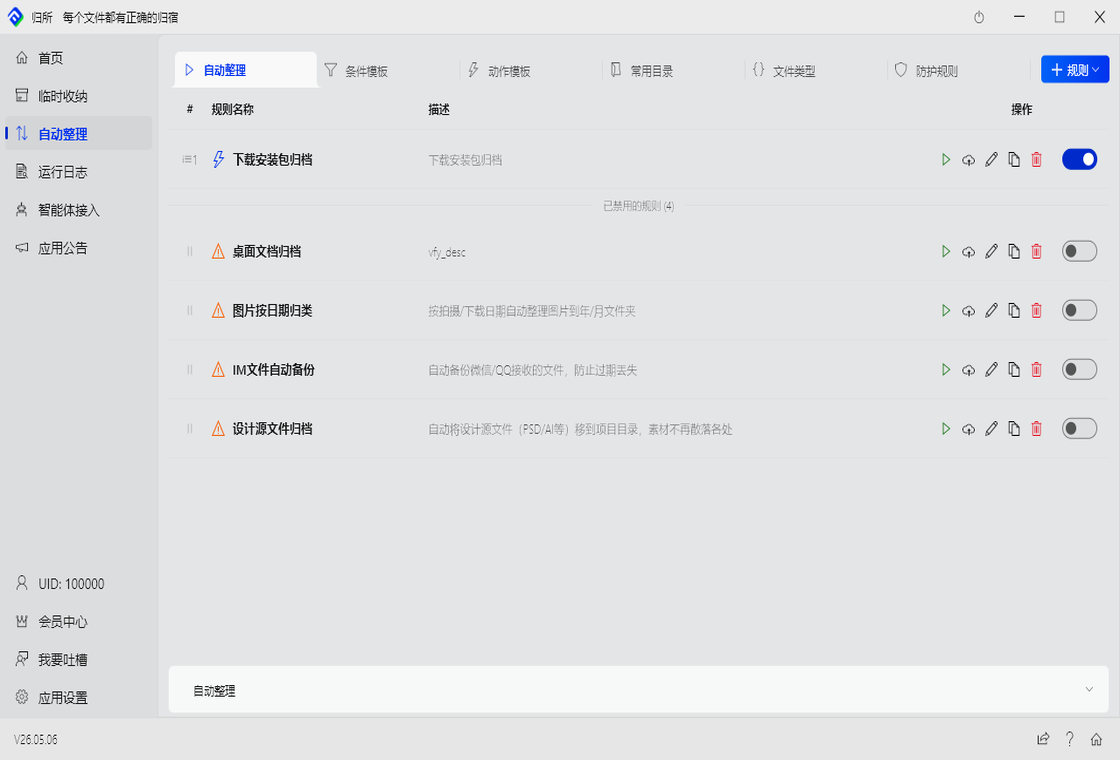
The core of FinalPlace. Three building blocks: watch targets decide where to watch, conditions decide when to trigger, actions decide what to do.
Set it once, run forever.
The scope where rules take effect. You can set different rules for different directories — each manages its own files independently.
Specific Directories
Monitor one or more specific directories, e.g. C:\Users\Downloads\, D:\Client Files\. Files entering any of these directories are caught and processed.
Entire Hard Drive
Apply across the whole drive. Useful for global rules like sorting all files by type or unified archiving policies.
Desktop
Desktop is where files land first. Monitoring it catches new files before they scatter across your system.
Multiple rules can run simultaneously. The same file can match multiple rules — FinalPlace executes them in priority order.
Conditions must be met before a rule fires. Each rule lets you choose a trigger mode:
Event-driven (default): Fires in real time when a file is created or modified. Lightweight and low-latency, suitable for most scenarios.
Scheduled: Runs full directory scans on a set schedule, in two flavors:
Filename Match
Filter by filename. Enter keywords like “contract”, “quote”, “invoice”, “drawing”. Supports exact match (equals the name) and fuzzy match (contains the keyword). Works regardless of file extension.
Extension Filter
Filter by file extension. Check .pdf, .xlsx, .dwg… single or multiple. Ideal for sorting all Word documents into the same archive.
File Size
Filter by file size. Videos over 10MB go to the video archive; screenshots under 100KB go to the screenshot folder; files over 1GB trigger a cleanup alert.
Created Time
Filter by creation date. Files created today, within the past week, before a certain date. Useful for periodic cleanup or finding recently added files.
Modified Time
Filter by last modified time. Find recently changed files or clean up old versions. E.g. files modified in the last 30 days, or documents untouched in 3 months.
File Attributes
Filter by system attributes. Read-only, hidden, system files… combine with other conditions to target files in specific states. E.g. find all read-only documents for batch processing.
Content Keywords
Read file content and search for keywords inside. Useful for files with consistent naming but identifiable content patterns, like contracts containing “Party A” / “Party B” keywords. Adds some performance overhead — use filename matching first when possible.
What to do when conditions are met. Configure multiple actions in sequence for chain processing. E.g. unzip first → then move → then clean up empty folders, all in one flow. When a target file already exists, choose to skip, overwrite, or auto-rename.
Move
Move files to a target directory. Supports auto-creating subfolders by date, e.g. D:\Archive\{YYYY}\{MM}\, keeping files organized by time. Can also sort by file type into type-named subfolders.
Copy
Keep the original file and copy a backup to the target location. Original stays untouched, backup is filed away. Good for “backup to a safe location, then organize the original” workflows.
Rename
Auto-rename by pattern. Common templates: {Date}_{FileName} (date prefix), {Seq}_{FileName} (sequence prefix), {Ext}_{FileName} (type prefix). Solves naming conflicts and enforces naming standards.
Unzip
Auto-extract archives to the target directory. Creates a same-named subfolder if it doesn’t exist. Original archive can be kept or moved after extraction. Great for Downloads folders that accumulate zip files.
Compress
Package multiple files into an archive. Great for periodic archiving — “compress all project files every Friday” — saving space and making files easy to share.
Create Directory
Auto-create folders by condition. Combined with the Move action, you can “create the destination and move into it simultaneously.” E.g. by date 2024\07\, by client name, or by project code.
Delete
Move files to the Recycle Bin — not permanent deletion. Read-only attributes are stripped before deletion to ensure clean removal. Good for clearing old installers and duplicates from Downloads.
Clean Directory
Remove empty folders, or delete files older than a specified number of days. Good for scheduled maintenance — “clear empty folders every day” or “remove temp files untouched in 30 days every week.”
Modify Attributes
Batch-change file attributes. Read-only, hidden, archive… use with other actions, e.g. strip read-only before moving, or lock files after organizing to prevent accidental edits.
Scenario 1: Designer's Drawing Management
.dwg extensionD:\Projects\Current\Drawings\ + create subfolders by year/monthScenario 2: Sales Contract Management
D:\Client Files\Pending\ → auto-version if same name exists (no overwrite)Scenario 3: Finance Invoice Processing
D:\Finance\2024\07\ → auto-version if same name exists (no overwrite)Scenario 4: Engineering Archive Handling
.zip, .rar, .7z extensionsA temporary file collection channel. Not a long-term organization system — it’s a “staging area” for files in active use.
How It Works
Activate temp storage and specify which folders to take over (monitor and intercept) — e.g. Downloads, Desktop. FinalPlace creates a matching storage folder on your desktop. Any file entering those directories is automatically moved to the desktop storage folder, keeping the original location clean.
Storage folders are created on the desktop, named Temp Storage_{Task Name}. When the project ends, process the files in storage (archive or delete), then deactivate — original directories return to normal.
When to Use
How to Close Out
When done, deactivate. Sort the storage folder contents — archive what needs keeping, delete what doesn’t.
The storage folder can be kept for reuse on similar future projects, or deleted outright. Either way, the original files are unaffected.
Don’t want to configure rules yourself? Let an AI agent do it. Just describe the outcome you want — AI understands, generates rules, and executes the organization. Fully transparent and under your control.
Step 1: Describe What You Want
Tell the AI your organization goal in plain language — no need to understand how the rule engine works:
“Move all PDF contracts from Downloads to the client files folder, organized by client name”
“Put all desktop screenshots into the image folder, sorted by date”
“This project’s materials are a mess — help me tidy it up”
Step 2: AI Previews the Plan
The AI calls FinalPlace via CLI, runs a dry-run on the target files, and shows you the action plan:
Step 3: You Confirm, AI Executes
The plan is shown to you — only after your approval does the AI actually execute. Every step is auditable and reversible.
Workspace Isolation
AI can only operate in directories you authorize. For unauthorized directories, the AI must request access — you approve before it can touch those files.
Preview & Confirm
AI must show you its plan and receive explicit approval before executing anything. No background operations happen without your knowledge.
Audit & Rollback
Every operation is logged and traceable. If something goes wrong, rollback restores files to their pre-operation state.
Cursor, Windsurf, Claude Desktop — any AI coding tool can connect to FinalPlace via CLI. If you’re already using Cursor or Windsurf for coding, those same tools can now manage your files.
Runs locally. Files never leave your machine.
Every file operation is recorded. Full transparency — any mistaken move can be undone.
What's Recorded
When · which file · which rule triggered · what action was taken · success or failure.
All five elements are on record. The log is FinalPlace’s “black box.”
How to Use
Rollback Supported
Except for permanent deletion (files in the Recycle Bin), every operation can be undone in one click.
Accidentally moved or copied something? Find the log entry and hit rollback — the file returns to its pre-operation state.
The component warehouse for your rules. Save frequently used condition combos, action sequences, directory paths, and file type groups — pull them into new rules without rebuilding from scratch.
Four sub-modules, each with a specific role.
Save a combination of multiple conditions as a template, then reference it in any rule with one click.
Save a sequence of actions as a template. E.g. “move to {target}/{YYYY}/{MM}/ + clean up duplicate versions” saved as a “Monthly Archive” template — any rule can reference this action sequence.
{YYYY}, {MM}, {FileName}, {Seq}Save frequently used directory paths here — select them when creating rules instead of copy-pasting full paths every time.
Directory Examples
D:\Client Files\D:\Projects\Current\E:\Archive\Path Validation
Each directory is checked for existence on save. After cloud sync on a new PC, paths that no longer exist show a warning icon — preventing rules configured with invalid directories.
Group related extensions under a name, then select the group in rules instead of checking extensions one by one.
Built-in Groups
| Group | Extensions |
|---|---|
| Images | .jpg, .png, .gif, .bmp, .webp, .svg, .ico, .heic |
| Video | .mp4, .avi, .mkv, .mov, .wmv, .flv, .webm |
| Audio | .mp3, .wav, .flac, .aac, .ogg, .wma |
| Documents | .doc, .docx, .pdf, .txt, .rtf, .odt |
| Spreadsheets | .xls, .xlsx, .csv, .ods |
| Design Source | .psd, .ai, .sketch, .fig, .xd |
Custom Groups
Create “CAD Drawings”, “Engineering Files”, “Email Attachments” and any other groups you need. Creation supports manual entry, drag files to auto-extract extensions, or drag a folder to recursively scan.
Organization is one thing — safety is the bottom line. FinalPlace includes layered protection to ensure important files are never accidentally touched.
Custom Protection
Mark any folder as a “forbidden zone” — no rule can touch it. Set D:\Important Documents\ as protected, and no rule will ever write files into it.
You can also protect specific file types, e.g. “all *.psd files exempt from all rules” — shielding your design source files.
Safe-Move
When moving files across drives (e.g. from HDD to SSD), FinalPlace uses a “copy → verify → delete source” strategy: copy the file to the destination, verify integrity, then delete the original only after confirmation.
Power loss or crash mid-transfer? The original is still there — no “source gone but destination incomplete” situation. This mechanism saves you during drive migrations and bulk file transfers.
Version Management
When a file is moved and a file with the same name already exists at the destination, FinalPlace doesn’t overwrite — it auto-generates a dated version file.
Report.pdf arriving again becomes Report_2024-07-15.pdf. All historical versions are kept; old versions are recoverable. Organized without losing history.
Office Temp File Protection
FinalPlace detects ~$ and .~lock temp files on Word/Excel/PPT files being edited. Active documents are neither moved nor deleted — no more “where did my in-progress file go?” moments.
Rules backed up to the cloud — nothing lost when switching PCs.
How Sync Works
Sign in and your local rules sync to the cloud automatically. On a new PC, sign in and your rules are restored exactly as you left them — your workflow continues uninterrupted.
Security Note
Only rule configurations sync — no file content ever touches the cloud. Your files stay on your machine, always.
The first screen when you open FinalPlace. Answers two questions: is it running? and what has it done?
Today's Stats
Files organized today, success rate, and average execution time. Open the app and immediately know what FinalPlace accomplished today.
Active Rules
How many rules are currently running, and which ones fired most often today. Instantly see which rules are actually working.
Quick Actions
New rule, new temp storage, view logs — common operations one click away, no digging through menus.
Recent Activity
Recent file operation records with filename, source, destination, and timestamp. Review anytime for anomalies.