
Cloud Sync & Template Library
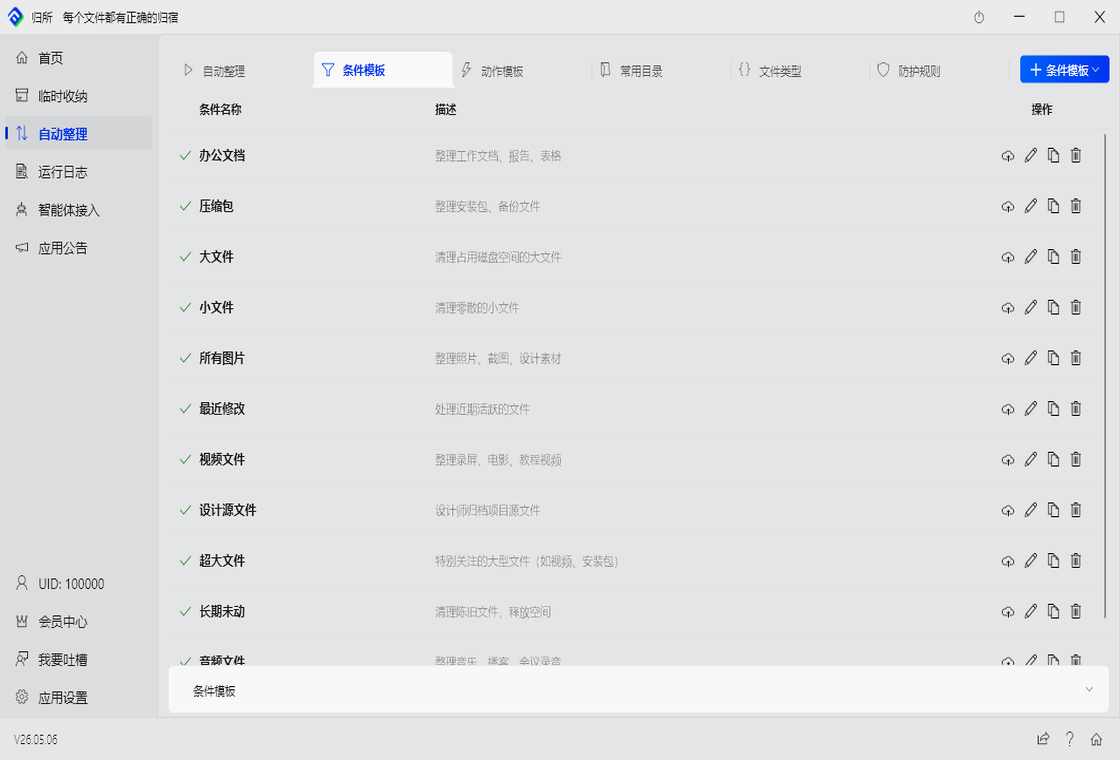
FinalPlace users can save common “condition combos” or “action combos” as templates, stored in the cloud. Switch computers or reinstall — templates are never lost.
Three Template Types
Section titled “Three Template Types”| Template Type | What It Saves |
|---|---|
| Condition Template | A set of filter conditions, e.g., “all image files” |
| Action Template | An action chain, e.g., “Move → Rename → Clean” |
| File Type Group | A set of extensions, e.g., “Design Assets: psd, ai, sketch” |
Condition Templates
Section titled “Condition Templates”Save your commonly used condition combinations. Import them next time instead of configuring one by one.
Example: Save an “Image Organization” condition template
Condition: extension contains jpg,jpeg,png,gif,bmp,webp,svgWhen creating a new rule, just pick “Import from Template” — done in one second.
Action Templates
Section titled “Action Templates”Save an entire action workflow:
Action chain:1. Remove read-only attribute2. Move to D:\Archive\{Year}3. Clean empty foldersFor rules needing the same actions, import this template directly.
File Type Groups
Section titled “File Type Groups”Custom extension sets for easier rule configuration:
| Group Name | Included Formats |
|---|---|
| Design Assets | psd, ai, sketch, fig, xd |
| Office Docs | docx, pdf, xlsx, pptx |
| Code Files | js, ts, py, java, cpp, go |
Cross-Device Sync
Section titled “Cross-Device Sync”Sign in to your account, and templates sync to the cloud automatically.
Switching computers? Sign in, templates download automatically — same as before.
Team Sharing (Advanced)
Section titled “Team Sharing (Advanced)”FinalPlace users can mark templates as “Public Template” and share them with other FinalPlace users:
- In “My Templates,” find the template you want to share
- Click the “Make Public” button
- Copy the generated share link and send it to team members
- They open the link and import it into their FinalPlace with one click
Great for teams standardizing their organization rules, or sharing best practices with the community.