
Temp Storage Guide
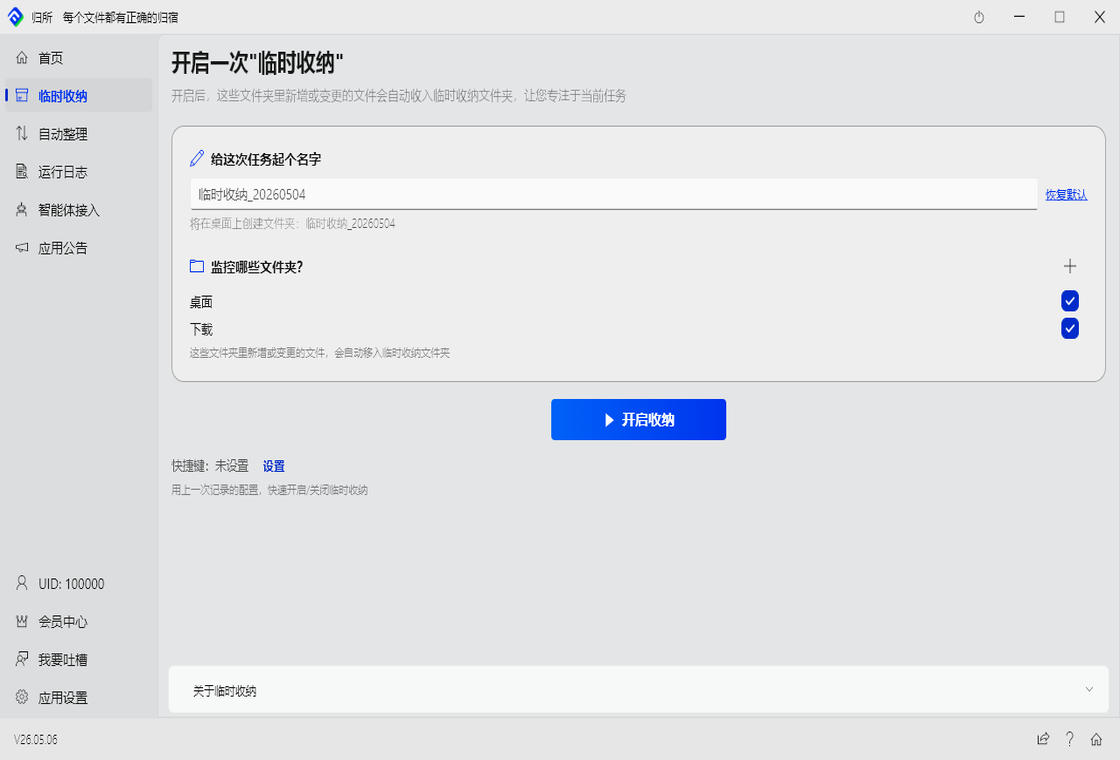
Temp Storage is great for: switching between projects and quickly gathering files, pre-cleanup gathering, or staging files before batch processing.
When to Use Temp Storage
Section titled “When to Use Temp Storage”Temp Storage is a manual on/off task, unlike regular rules:
| Comparison | Regular Rule | Temp Storage |
|---|---|---|
| Switch | Always on, runs automatically | Manual start, manual stop |
| Ideal for | Day-to-day continuous organization | One-off organization tasks |
Examples:
- Project A half-done, need to switch to B → turn on Temp Storage, gather Project A files first
- Desktop has a month’s worth of files → turn on Temp Storage, gather everything together for batch processing later
How to Use It
Section titled “How to Use It”- Go to the “Temp Storage” page
- Name the storage task (e.g., “Project A Organization”)
- Choose what to organize: Desktop / Downloads / Custom directories
- Click “Start Storage”
FinalPlace automatically creates a system rule and starts moving files to the storage location.
Default storage location:
<Your Documents>/FinalPlace/<TaskName>/Temp Storage/While It’s Running
Section titled “While It’s Running”- New files dropped in are automatically stored
- Each file waits 3 seconds (to let downloads/writes finish)
- Only 1 storage task can run at a time
- Starting a new task automatically stops the old one
Stopping Storage
Section titled “Stopping Storage”When you click “Stop Storage,” choose what to do with the files:
| Option | Effect |
|---|---|
| Don’t clean (default) | Files stay in storage; handle them manually later |
| Clean | Move all files in storage to Recycle Bin |
What If FinalPlace Crashes?
Section titled “What If FinalPlace Crashes?”If FinalPlace exits unexpectedly while a storage task is running, on restart it automatically checks:
- Storage destination still exists → restore task state
- Storage destination is gone → clean up invalid rules automatically
Typical Use Cases
Section titled “Typical Use Cases”Scenario 1: Switching Projects
Section titled “Scenario 1: Switching Projects”Project A half-done, need to switch to B → turn on “Project A Storage” → gather files into
FinalPlace/ProjectA/→ go work on Project B → come back later to organize Project A
Scenario 2: Gather Files from Multiple Sources
Section titled “Scenario 2: Gather Files from Multiple Sources”Collect files from your desktop, Downloads folder, and other locations into one place. Once all files are fully downloaded, organize them in one batch at the storage location.
Scenario 3: Bulk File Receiving
Section titled “Scenario 3: Bulk File Receiving”Colleagues send you a bunch of files over LAN or chat — start a Temp Storage task, files get collected automatically, you deal with them later when you’re ready.