
Run Log Guide
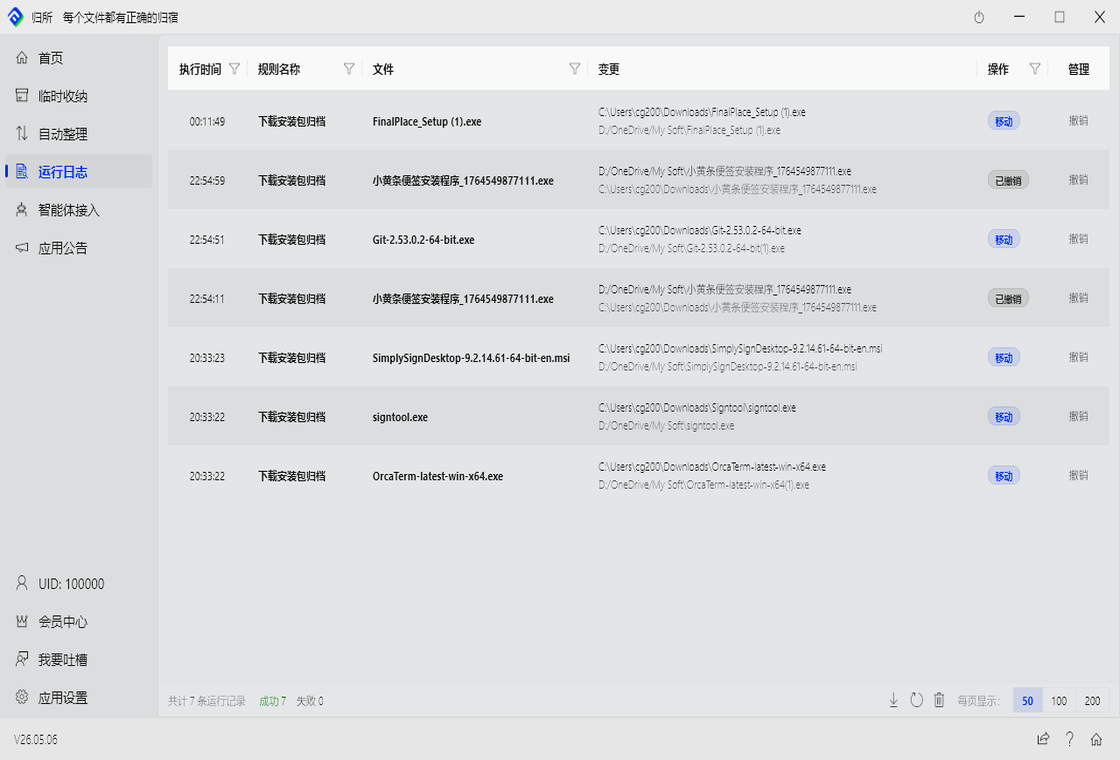
The run log is FinalPlace’s “black box” — every organization operation is recorded, both successes and failures. You can check anytime: when, which file, where from, where to, and the result.
What Does the Log Look Like?
Section titled “What Does the Log Look Like?”Go to FinalPlace → “Run Log” page. You’ll see a table:
| Column | Records |
|---|---|
| Time | When the operation executed |
| File | The file that was processed |
| Action Type | Move, copy, delete, rename… |
| Result | Success ✓ or Failure ✗ |
| Source | Where the file came from |
| Destination | Where the file went (shown for move/copy only) |
Filtering: Find What You Need
Section titled “Filtering: Find What You Need”If you have a lot of logs, use filters:
| Filter | How to Use |
|---|---|
| By rule name | Type the rule name, see only that rule’s operations |
| By action type | Show only “Move” or “Delete” etc. |
| By result | Show only “Successful” or “Failed” |
| By date range | See logs from a specific day or time period |
Exporting Logs
Section titled “Exporting Logs”Export logs as a file for archiving or reporting:
- Click “Export” in the top right
- FinalPlace generates a CSV file, save it locally
Exported data includes all columns and can be opened in Excel or WPS.
Clearing Logs
Section titled “Clearing Logs”Logs accumulate over time. Clean them periodically:
- Click “Clear Logs” in the top right
- Confirm — all records are deleted
Log Retention
Section titled “Log Retention”Logs are kept forever by default — they don’t expire automatically unless you clear them.
If you have many logs, FinalPlace paginates automatically. Loading more only shows the next page, not everything at once.
Something Went Wrong — Now What?
Section titled “Something Went Wrong — Now What?”When you see a “Failed” entry, troubleshoot like this:
- Read the error — failed entries show a brief reason
- Check the file status — the file may be locked by another program
- Handle manually — decide what to do based on the reason
Common failure reasons:
| Reason | What It Means |
|---|---|
| File in use | Another program has this file open; try again later |
| Destination doesn’t exist | The target folder in the rule was deleted |
| Insufficient permissions | No write access to the destination folder |
| Disk full | Not enough space on the target disk |
| File already exists | Same-named file in destination with “Skip” policy |
Anti-Trigger Protection Records
Section titled “Anti-Trigger Protection Records”FinalPlace has a built-in protection: the same file won’t be processed twice in a short window. If you find a file “didn’t move at all,” check here to see if it was intercepted by this protection.
- When troubleshooting “why didn’t this file move?”, check here first
- Records look similar to regular logs