
How to Auto-Organize QQ Received Files Effortlessly
Your QQ File Directory Is Quietly Becoming a “Junkyard”
Section titled “Your QQ File Directory Is Quietly Becoming a “Junkyard””Open your QQ received files folder — usually at C:\Users\YourUsername\Documents\Tencent Files\YourQQNumber\FileRecv\ — what do you see inside?
Course materials, game screenshots, work contracts, design drafts, short videos, assorted memes… all crammed together, with filenames like Screenshot_20240315_1.png, New Microsoft Word Document (3).docx, and Untitled.png that tell you absolutely nothing about the content. After using QQ for a few years, this directory might have accumulated over a thousand files.
The problem doesn’t stop there. Files from different groups and different friends all get dumped into the same FileRecv directory — no categorization, no labels. You want to find a PDF contract a colleague sent last month, but searching through the entire directory yields nothing. What’s worse, if you switch computers or reinstall QQ, those scattered files might be lost forever.
Manual sorting? Drag files into a few folders, categorize them — sounds simple, but in practice, no one can keep it up. Because QQ files continuously “flow in,” you organize today, and tomorrow dozens of new files pile up again. It’s an endless cycle.
Manual Sorting vs Search Tools vs FinalPlace
Section titled “Manual Sorting vs Search Tools vs FinalPlace”Many people have tried different approaches with varying results:
| Dimension | Manual Drag-and-Drop | Everything / Listary Search | FinalPlace Rule Engine |
|---|---|---|---|
| Auto-categorize | ❌ Drag everything yourself every time | ❌ Search only, no organizing | ✅ Monitors directories, auto-sorts |
| Split by type | Manual folder creation | Not supported | Auto-sort to corresponding folders by extension |
| Distinguish by source | Not possible | Rely on filename luck | Match by filename keywords |
| Auto-process after setup | ❌ | ❌ | ✅ Continuous background monitoring |
| Learning curve | Low | Medium | Low, visual management |
| File loss risk | High (manual ops prone to accidental deletion) | Low | Low (move only, never delete) |
The key difference: search tools (Everything, Listary) solve the “find files” problem, while FinalPlace solves the “files shouldn’t be messy in the first place” problem. Searching is a reactive fix; a rule engine is proactive sorting — every time QQ receives a file, it automatically places it in the right folder.
Three Steps to Auto-Organize QQ Files
Section titled “Three Steps to Auto-Organize QQ Files”Step 1: Download and Install FinalPlace
Section titled “Step 1: Download and Install FinalPlace”Go to the FinalPlace website to download the installer, then double-click to install. FinalPlace is a Windows desktop application — no internet registration required, just install and start using.
Step 2: Create Rules — Monitor the QQ FileRecv Directory
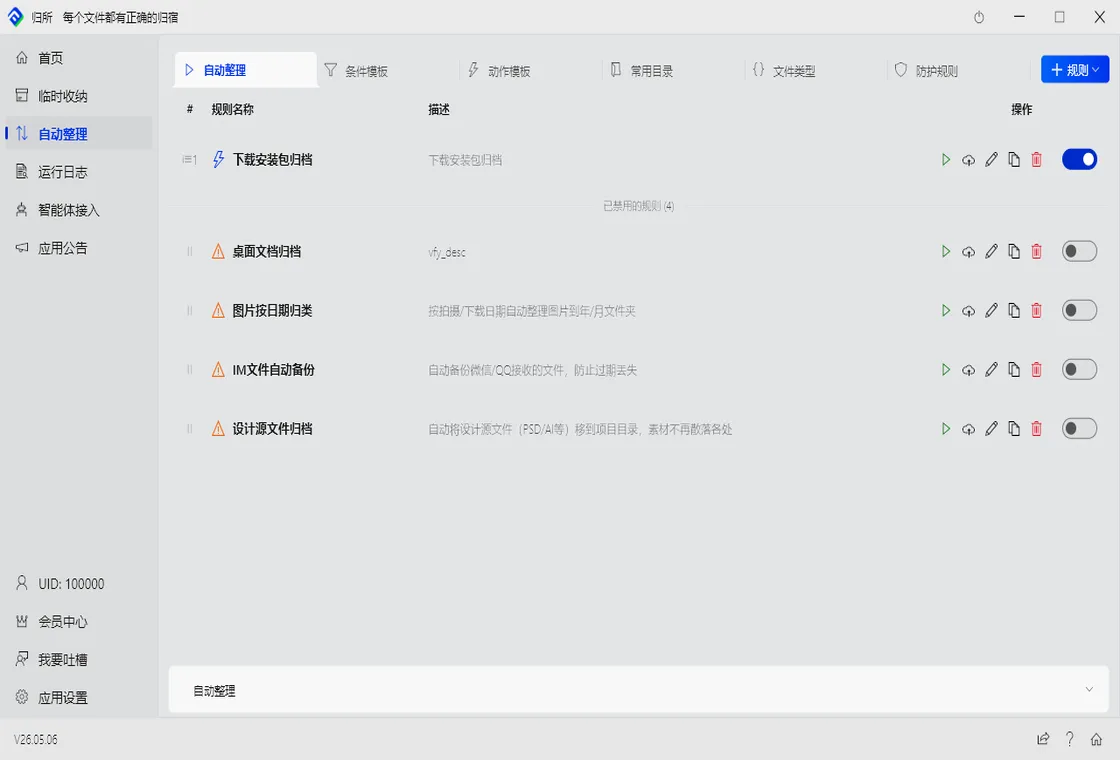
Section titled “Step 2: Create Rules — Monitor the QQ FileRecv Directory”Open FinalPlace, click “New Rule,” and configure the following:
- Watch Directory: Select your QQ received files path, i.e.,
C:\Users\YourUsername\Documents\Tencent Files\YourQQNumber\FileRecv\ - Match Conditions:
- Sort by extension:
.jpg .png .gif→ Images folder;.doc .docx .pdf→ Documents folder;.mp4 .mov→ Videos folder;.zip .rar .7z→ Archives folder - Match by filename keywords: Filename contains “contract,” “report,” “proposal” → Work documents folder; contains “assignment,” “courseware,” “notes” → Study materials folder
- Sort by extension:
- Action: Automatically move matched files to designated directories, e.g.,
D:\My Files\QQ Files\Images\,D:\My Files\QQ Files\Documents\
A single rule can neatly categorize mixed QQ files. You can create multiple rules, flexibly combining conditions like extension, keywords, and file size.
Step 3: Run the Rules
Section titled “Step 3: Run the Rules”Click “Run,” and FinalPlace will immediately scan the QQ received directory, sorting all existing files into place according to your rules. You can also enable scheduled triggers to have FinalPlace auto-scan every few hours, or set it to start on boot — that way, whenever QQ receives a new file, FinalPlace automatically files it away without you lifting a finger.
Real Scenario: A College Student’s QQ Group File Nightmare
Section titled “Real Scenario: A College Student’s QQ Group File Nightmare”Lin is a junior in college. Her QQ has no fewer than 20 groups — major course material groups, club groups, part-time job groups, gaming groups… Files received every day range from class notes to event posters, from club sign-up forms to game screenshots, all dumped into the FileRecv directory.
During finals season, Lin needed to find a study outline a classmate had shared in a group chat last week. She scrolled through QQ’s file list for a long time, then sifted through hundreds of files in the FileRecv directory like searching for a needle in a haystack — it took twenty minutes to find that PDF. And similar scenarios happen almost every week.
After using FinalPlace, Lin set up one rule: in the QQ received directory, all .pdf .doc .docx .ppt .pptx files automatically move to D:\Study Materials\, and files with names containing “courseware” or “notes” get further sorted into a Courseware & Notes subfolder. From then on, she opens her study materials directory to find neatly organized categories — no more spending ages hunting for a single file.
Who Is It For?
Section titled “Who Is It For?”- College Students: Course materials, lecture slides, and assignment templates from QQ groups pile up like mountains. Auto-archive by subject or file type for easy retrieval during finals
- Gamers: Game screenshots, screen recordings, and mod files frequently received in QQ groups — auto-sort into image and video folders, no more mixing with documents
- Community Managers: Manage multiple QQ groups, receive large volumes of assets, spreadsheets, and event posters daily — need quick categorization and archiving for later use
- Remote Workers: Transfer files with clients and colleagues via QQ — contracts, design drafts, requirement docs need automatic archiving to project folders to avoid losing important files
Summary
Section titled “Summary”The chaos of QQ received files is fundamentally a “continuous inflow without sorting” problem. Manual sorting only treats the symptoms, and search tools only find without organizing. FinalPlace’s rule engine lets you set up rules once, and then every QQ received file automatically goes where it belongs — images to image folders, documents to document folders, and important work files can be further categorized by keywords.
FinalPlace pricing: 3 months $10, 1 year $28 (recommended), 3 years $58 (was $84, limited-time 31% off), lifetime buyout $88. Runs locally, files never leave your computer, privacy is fully protected.
If you’re also struggling with QQ file clutter, give it a try: Download FinalPlace Now
Want to explore more use cases? These articles may also help:
- How to Auto-Organize WeChat Received Files
- How to Auto-Organize WeCom Received Files
- How to Auto-Organize DingTalk Received Files
- How to Auto-Organize Feishu (Lark) Received Files
If you have any questions, feel free to contact us: service@yynote.cn