
WeChat, QQ, DingTalk, Feishu File Organization Guide
Files Scattered Across Your C Drive — Are You Affected?
Section titled “Files Scattered Across Your C Drive — Are You Affected?”Open your computer and think: how many files did you receive through WeChat today? Did someone share a design draft in a QQ group? Did a subordinate submit a weekly report on DingTalk? Did a client send a contract via Feishu?
Can you find those files right now?
In modern office environments, we simultaneously use multiple chat apps every day. WeChat handles daily communication, QQ retains old groups and file-sharing habits, DingTalk manages attendance and approvals, WeCom handles internal company affairs, and Feishu drives project collaboration. Each app receives and stores files in different locations — and these locations are often buried deep in some corner of the C drive, neither intuitive nor unified.
What’s more frustrating is that different apps use completely different file paths. You want to find a PDF a client sent last week via Feishu, but after searching the Documents directory for ages, you still can’t find it — because Feishu stores files in AppData. You want to clean up the several GB of WeChat received files, but you’re afraid of accidentally deleting important materials.
Default File Receiving Paths by Platform
Section titled “Default File Receiving Paths by Platform”First, figure out where files are actually stored — this is step one of organization. Here are the default file receiving paths for mainstream chat apps on Windows:
| App | Default File Receiving Path |
|---|---|
C:\Users\Username\Documents\WeChat Files\WeChatID\FileStorage\ | |
C:\Users\Username\Documents\Tencent Files\QQNumber\FileRecv\ | |
| WeCom | C:\Users\Username\Documents\WXWork\EnterpriseID\Global\Files\ |
| DingTalk | C:\Users\Username\Documents\DingTalk\ |
| Feishu (Lark) | C:\Users\Username\AppData\Local\Lark\SDK\ |
Actual paths may vary depending on app version and installation options. You can check the specific path in each app’s “Settings → File Management.”
See? Five apps, five completely different directories. Some are under Documents, some are hidden deep in AppData. Just remembering these paths is headache-inducing enough — let alone managing and organizing them one by one.
Why You Need Unified Organization
Section titled “Why You Need Unified Organization”All files received through chat apps face the same set of problems:
Scattered everywhere. A contract might come from Feishu, a design image from WeChat, and a spreadsheet from DingTalk. They sit in five different directory trees with no connection to each other. When you need to find “all contracts from last month,” you have to search through each directory one by one.
Duplicate downloads. The same file gets forwarded multiple times in group chats, and each app stores its own copy. C drive space gets silently consumed by large numbers of duplicate files, and you have no idea which ones are duplicates.
Expiration and loss. Chat apps have file expiration mechanisms. WeChat files may be cleaned up if not opened within a certain period, and DingTalk files also have retention limits. If important files aren’t saved elsewhere in time, they’re gone once they expire.
C drive space consumption. Chat files are stored on the C drive by default. Over time, several GB or even dozens of GB of received files quietly eat up system disk space, making your computer increasingly sluggish.
Source confusion. A single directory mixes documents, images, archives, and installers. It’s hard to tell at a glance who sent which file, whether it’s important, or whether it’s already been processed.
The root cause of these problems: chat apps store files by source (which app received them), not by the file’s own type and purpose. What you need is a unified organization approach sorted by file type.
FinalPlace’s Unified Solution: One Rule Set, Sort by Type
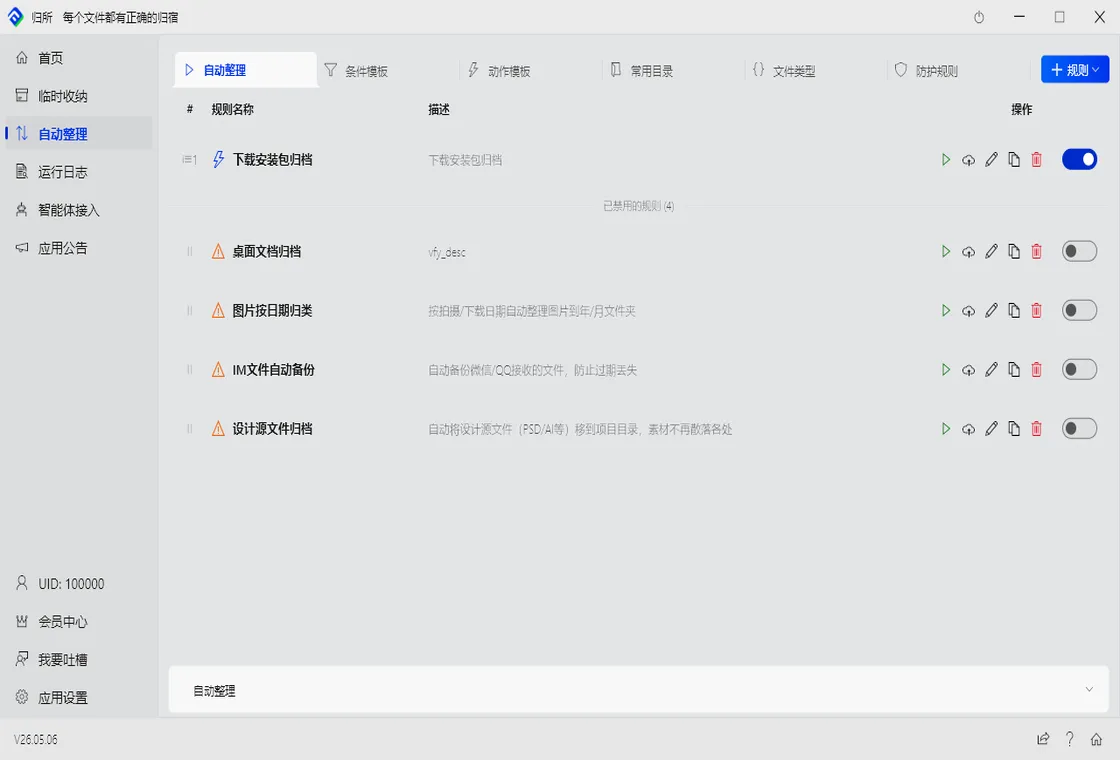
Section titled “FinalPlace’s Unified Solution: One Rule Set, Sort by Type”FinalPlace is a Windows local file auto-organization tool. Its core logic is simple: watch directory → condition match → execute action. For the scattered chat files problem, FinalPlace’s solution is — regardless of which chat app a file comes from, sort it uniformly by file type.
Step 1: Plan Your Target Directory Structure
First, create target folders on your D drive (or another non-system drive), for example:
D:\Chat Files\├── Documents\├── Images\├── Archives\├── Spreadsheets\└── Others\Step 2: Create Multiple Rules to Monitor Each IM Directory
Create one rule for each chat app in FinalPlace. Take WeChat as an example:
- Watch Directory:
C:\Users\YourUsername\Documents\WeChat Files\*\FileStorage\File\(use wildcards to match all WeChat accounts) - Condition: File extension is
.doc / .docx / .pdf→ Move toD:\Chat Files\Documents\ - Condition: File extension is
.jpg / .png / .gif→ Move toD:\Chat Files\Images\ - Condition: File extension is
.zip / .rar / .7z→ Move toD:\Chat Files\Archives\
Apply the same logic to QQ, WeCom, DingTalk, and Feishu — create a set of rules for each, replacing the watch path with the corresponding app’s file directory.
Step 3: Enable Scheduled Runs
Set FinalPlace to auto-run every 30 minutes (or on startup). This way, newly received files from chat apps are automatically moved to the corresponding type-based folders under D:\Chat Files\, and the C drive stops accumulating.
The benefits are obvious:
- Slim down your C drive: Files are unified onto the D drive — the system disk is no longer filled with chat files
- Find by type: All contracts in the “Documents” folder, all screenshots in the “Images” folder — clear at a glance
- Avoid duplicates: Same-type files are stored together, making duplicate files easier to spot and clean up
- Prevent loss: Important files are promptly moved out of chat app directories, immune to expiration cleanup
Detailed Organization Guides by Platform
Section titled “Detailed Organization Guides by Platform”Each chat app has its own file management characteristics and organization tips. We’ve compiled detailed guides for five platforms — check them as needed:
- 📱 How to Auto-Organize WeChat Received Files — WeChat file paths, cleanup methods, and auto-sorting rules
- 💬 How to Auto-Organize QQ Received Files — QQ FileRecv directory management and file archiving
- 🏢 How to Auto-Organize WeCom Received Files — Unified management of WeCom work files
- 🔔 How to Auto-Organize DingTalk Received Files — DingTalk file paths and approval attachment auto-archiving
- 🐦 How to Auto-Organize Feishu (Lark) Received Files — Feishu Lark directory and project file organization
Who Is This Solution For?
Section titled “Who Is This Solution For?”Office Workers: Receive large volumes of work files daily through WeChat, DingTalk, and WeCom — need to find receipts for month-end reimbursement and contracts for year-end archiving. After unified organization, all documents are in one directory, sorted by type for instant access.
Project Managers: Coordinate with multiple teams simultaneously — design files in Feishu, approval workflows in DingTalk, client materials in WeChat. FinalPlace helps consolidate all project-related files by type — no more searching in different places.
Finance / Admin: Invoices, reports, and contracts are scattered across different chat apps — manual sorting is time-consuming and labor-intensive. After setting up rules, FinalPlace automatically routes spreadsheet-type files to designated folders, saving massive amounts of organization time each month.
Sales / Customer Success: chat apps are a major intake channel for client files - contract scans, requirement docs, quote confirmations all arrive here. Beyond sorting by type, you can go further and auto-archive CRM files by client name, sending every document straight into the right client folder.
Start Organizing Your Chat Files
Section titled “Start Organizing Your Chat Files”Chat app file management is an unavoidable problem in modern office work. Rather than manually searching and sorting each time, set up a set of automated rules once and for all.
FinalPlace provides a flexible rule engine — you simply tell it “what type of file goes where,” and it handles the rest automatically. All file processing is done locally with zero data uploads — your privacy is fully protected.
- 3 months $10
- 1 year $28 — recommended first choice
- 3 years $58 (was $84, limited-time 31% off) — better value for long-term use
- $88 lifetime buyout — one-time purchase, lifetime use
Related Reading:
- How to Auto-Organize WeChat Files: 3 Steps to Auto-Sort
- How to Auto-Organize Feishu (Lark) Files Effortlessly
👉 Explore FinalPlace Features · Download FinalPlace Now
If you have any questions or suggestions, feel free to contact us: service@yynote.cn